
The airport screen
Header, tabs, Fly, the buttons up top
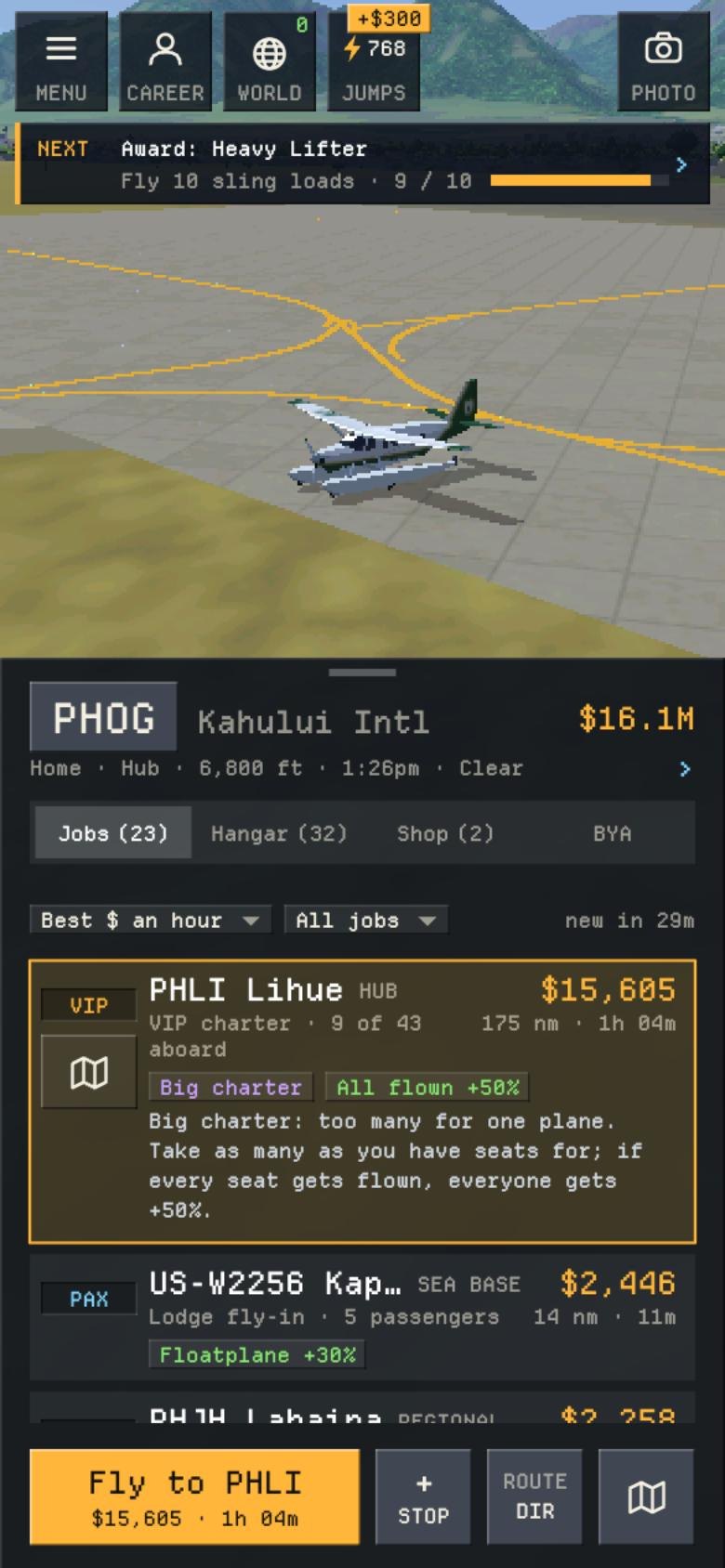
The airport screen on a phone: the field, its tabs and the job board
Wherever you land, the airport screen is home base: your plane parked on the apron, and a panel of everything you can do there.
The header
- The airport’s code and name, and your money. A ? after the code means a barn find waits here.
- A line on the field: Home if it’s yours, its type, its longest runway, the local time and weather, and the holder’s colours if a company holds it.
- Tap the code or the header for the field’s card: its city, weather, level and pay, who holds it, its leaderboard, and a button to make it your home.
- The week’s world event, in gold, when it’s here: tap it for the World screen.
The tabs
| Jobs | The job board: work from here |
|---|---|
| Hangar | Your planes (those here first) and any barn finds you’re restoring |
| Shop | Planes for sale here today (none at seaplane bases or helipads) |
| Company | Who holds the airport, and your company’s base, planes and work here |
The bottom row
Fly takes off with the picked job (the board’s best, unless you tap another) and says where to, the pay and how long. Beside it are Route (Direct or Scenic) and the map. With no job picked, Fly becomes Free flight: tap an airport on the map.
Up top
| Menu | Career, For sale, Jumps, Company, World, Wiki, Discord and Options |
|---|---|
| Career | Your career. A light means a checkride is ready |
| World | The World screen, with the number of flights in the air right now. A light means event news |
| Jumps | Your jumps and the daily check-in. A badge means the check-in is waiting: tap to collect |
| Photo | Photo mode, for a picture of your plane on the apron |
Under them, the goal card shows your next step: the first solo, a checkride that’s ready, a second plane, the next license, or the nearest award. Tap it to go there.
On a phone, drag the panel up to see more and down to see your plane again. Drag the plane to walk round it.
See also
- The job boardWhat’s on offer and when it changes
- Buying and sellingThe shop, stock, selling back
- CompaniesFounding, joining, leaving
- Low and scenicThe route: Direct or Scenic